

elastiquePitch 2.5.0 — Mac version
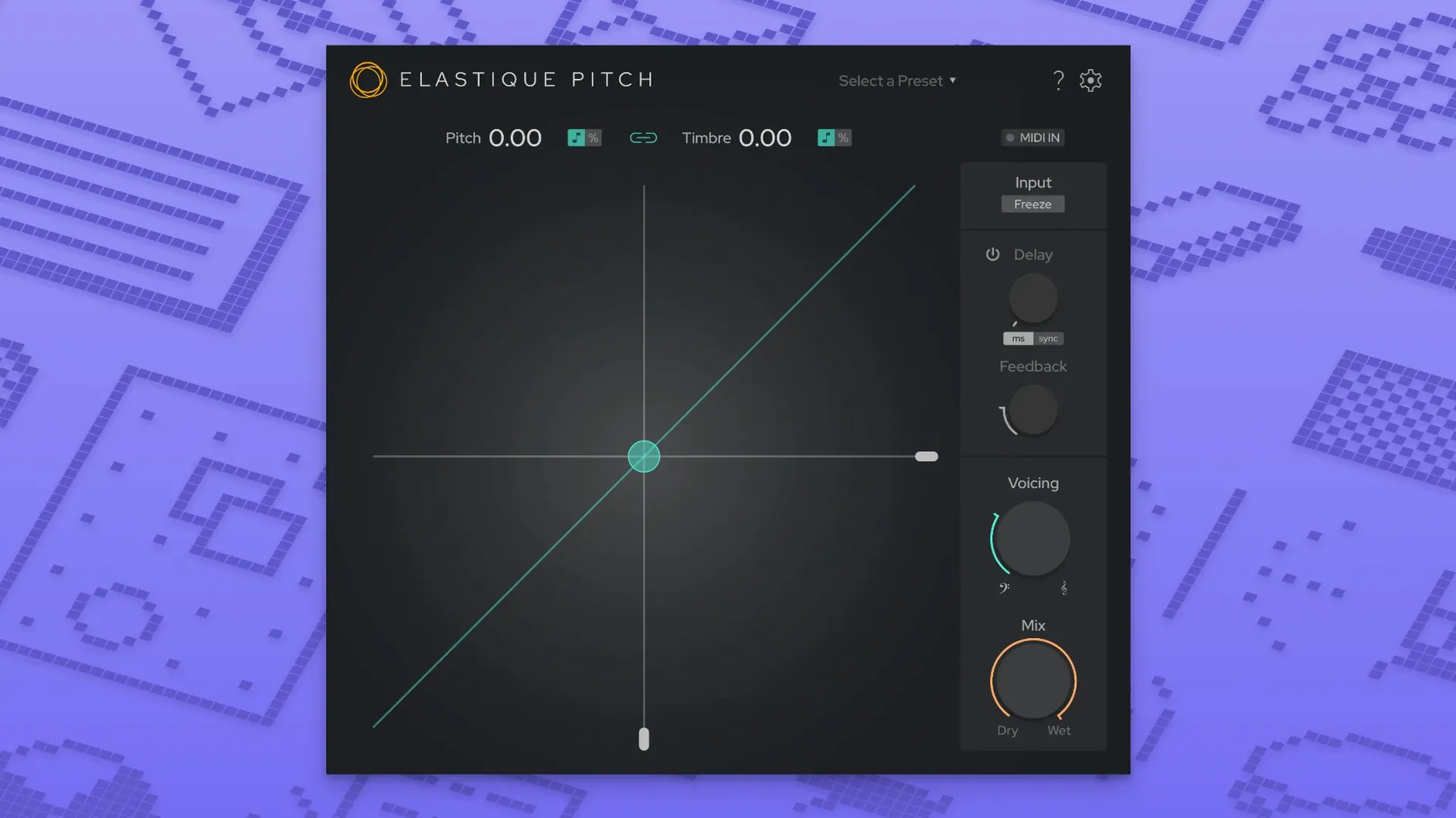
The Freeze button is where things get properly interesting. It grabs a grain of audio and holds it, letting you sweep the pitch of a single frozen moment while the track plays on underneath. Properly weird, in the best way.
elastiquePitch comes in VST3, AU and AAX native flavours — a 64-bit plug-in that runs on both Intel and Apple Silicon Macs. It works across up to 16 channels now, so surround mixing isn't off the table. The interface got a proper tidy-up in version 2.5, making the two main sliders — pitch and formant — dead easy to read at a glance.
The clever bit is that pitch and timbre move independently. You can shift a vocal up a fifth without making it sound like a chipmunk, or drop the formant to darken a synth line while keeping the tuning locked. The ÉLASTIQUEPRO algorithm underneath keeps the processing clean and responsive, with no awkward warbling unless you dial it in on purpose.
There's a pitch-shifted echo tucked in there too, handy for thickening up a sparse lead or building a quick stereo spread from a mono source. It's a plug-in that rewards tweaking, and it's light enough on the CPU that you don't have to commit to a bounce before you've properly explored an idea.
Unlink the formant slider for independent control
Out of the box, elastiquePitch does clean, neutral shifting. A couple of tweaks make it feel more like your own tool.
- Link button. By default, pitch and formant sliders move together. Unlink them straight away — it's the whole point of the plug-in. You want independent control over note and timbre.
- Echo mix. The delay sits at zero when you load it up. Dial the mix knob to about 25% and set the time short for a doubling effect that doesn't shout "delay."
- Grain size. The Freeze function uses a grain length setting tucked in the advanced panel. A shorter grain gives you a glitchy, almost granular-synthesis texture. A longer grain holds smoother, more pad-like sustains. Worth experimenting before you need it in a hurry.
- Channel mode. If you're working in stereo only, check the routing isn't set to a wider surround mode by accident — it saves a sliver of CPU and keeps your session tidy.
Doubling a vocal without the chorus effect
A proper double-track needs a second take, but sometimes you just need it done. Here's a workflow for a convincing fake double from a single vocal line.
- Duplicate your vocal track. On the copy, insert elastiquePitch as the first insert.
- Unlink pitch and formant. Leave pitch at 0 cents. Drop the formant slider to about -3 semitones. This darkens the timbre slightly, mimicking a different throat.
- Add a tiny pitch wobble. Assign a slow sine-wave LFO from your DAW to the pitch parameter, range about ±5 cents, speed around 0.3 Hz. Real singers drift.
- Engage the echo section. Set delay time to 20–35 ms, mix to 30%, feedback off. This pushes the double back in time and off to one side.
- Pan the original slightly left, the double slightly right. Tuck the fader on the double 4–6 dB lower than the main.
The result sits behind the lead, fattens the centre image, and doesn't smear into a chorus-y wash. If you hear phasing, nudge the delay time a millisecond or two.
Automating Freeze to stretch a final chord into a pad
Last Tuesday I was tidying up a track that needed an ending. The final chord rings out on a rhodes, nice but a bit polite. I stuck elastiquePitch on the rhodes bus and automated the Freeze button to engage on the last beat of the bar.
With the grain frozen, I grabbed the pitch slider and rode it down an octave over four bars. The rhodes turned into this grainy, slowing tape-stop thing — not a clean pitch bend, more like a note crumbling. The formant stayed put so it didn't go muddy, just hollowed out as it dropped.
I added a second instance on a send from the vocal, froze a sibilant moment — a "sss" from the last word — and pitched it up a fifth with a long grain. Sounded like a distant whistle. Mixed low, it gave the fade-out some texture that wasn't there before.
By the time I printed it, the CPU meter had barely twitched. Three instances of elastiquePitch running real-time, plus the rest of the session, and the fan never spun up. That's the sort of headroom that keeps you experimenting instead of committing early.
- Interface redesigned for quicker, clearer control.
- Multichannel support expanded to 16 channels.
- Updated to the latest ÉLASTIQUEPRO algorithm.
- macOS 10.15 or newer
- Intel or Apple Silicon Mac
- VST3, AU or AAX host
Questions from the bench
Can elastiquePitch change pitch without affecting formants?
Yes. Pitch and timbre are controlled by separate sliders, so you can shift tuning up or down while keeping the vocal character natural.
What plug-in formats does version 2.5 support on Mac?
It supports VST3, AU, and AAX native formats — all 64-bit, running on Intel and Apple Silicon Macs.
What does the Freeze function do?
Freeze captures a small grain of the incoming audio and holds it, letting you manipulate its pitch in real time while the rest of the signal continues.







 Back up
Bench talk (0)
Sign in or get a library card to pin up a note.
Nobody has chimed in on this card. If you have used it on an old Mac, say which one.