
LFOTool 1.768 — Mac version
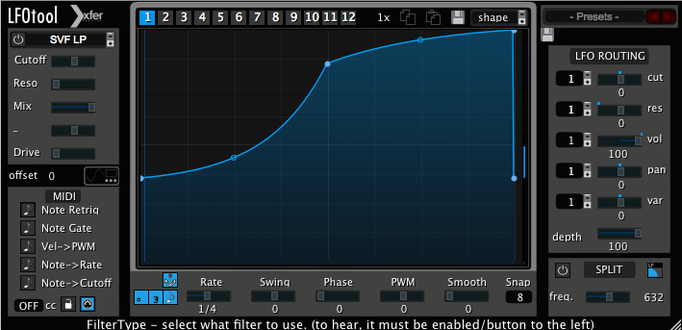
Drawing modulation in a DAW lane works, but it stays static. You hear the same sweep every time. LFOTool solves that by turning custom curves into moving LFOs that react to your track, plus it can fire MIDI at the same time.
Drawing a bass-duck curve instead of a sine dip
You drop it on an audio track, a bus or even a MIDI lane driving a soft synth. On a bass bus it ducks the low end to the kick with a shape you draw yourself—not just a sine dip. On a pad or vocal send it can pan four graphs at once, each pulling Cutoff, Reso and Pan in different directions. Twelve graphs sit inside one preset, and you switch between them with a MIDI note or automation lane, so a single instance can shift roles as the arrangement moves.
The MIDI side of it
While it is mangling incoming audio, LFOTool also spits out a MIDI CC stream. Route that to a software instrument, another effect or a hardware synth that listens for CC messages, and your drawn LFO becomes a modulation source for anything in reach. Up to four graphs run together, which means four independent modulation curves hitting different targets from one plug-in window. It runs on Intel and Apple Silicon Macs from macOS 10.11 onward, and on Windows, inside any VST or AudioUnit host.
Matching a kick's decay with the tension editor
Dance music producers tend to grab it first. The sidechain-style pumping effect is the obvious use, but the point-and-tension editor means you can shape the release curve to follow a kick drum's decay rather than settling for a preset triangle. House, techno, drum and bass, garage — if your mix leans on rhythmic movement, LFOTool earns its place on the bass bus.
Sound designers working on film, game or library material get something different out of it. The MIDI CC output turns a single drawn curve into a controller for anything that responds to CC numbers, from a synth's filter cutoff to a reverb's wet/dry. You can sketch a gesture once and hear it drive three different targets without copying automation lanes about. On an older Mac that is already running a modest CPU, the C++ core matters — complex modulation stays light.
Mix engineers who receive messy sessions use it as a cleanup tool. A vocal bus that swells too much in the low mids can be tamed with a gentle, tempo-locked dip rather than a static EQ cut. A guitar part that fights the snare can duck just enough to let the transient through. It is the kind of fix that sonic mojo by hand would take an hour to automate.
Audio routing needed even for MIDI-only use
One common stumble is forgetting that the plug-in processes audio and sends MIDI at the same time. If you only want the MIDI stream, you still need to route some audio through the track or the host may not wake the plug-in up properly. Drop it on a silent bus and feed it a dummy signal if your DAW complains.
Another one: graphs switching by MIDI note can catch people out. If you have mapped graph changes to notes and a stray note sneaks in from a keyboard or an old clip, your LFO curve jumps mid-bar. Keep the switch notes on a separate MIDI channel, or use automation instead when you do not need live control.
On Apple Silicon hosts still running under Rosetta, older project files may load LFOTool as an Intel-only insert. It will work, but the CPU hit is higher. A fresh insert of the native version usually sorts that.
If a curve feels steppy at very slow rates, zoom right into the editor and soften the tension handles. The plug-in is sample-accurate, but a sharp point between two far-apart nodes can still sound like a staircase on a long sweep.
A real-world use
Sam, a producer who makes lo-fi house on a 2015 MacBook Pro, runs LFOTool on her drum bus. The kick and snare are already recorded, but the hats and shaker loop were lifted from an old sample pack and sit too flat. She draws a four-step curve that opens a high-shelf filter on the offbeats, then routes the MIDI output to a software synth's filter cutoff as well. The result is a push-pull between the loop and the synth that follows the track's swing — including the BPM swing setting built into the plug-in. When the chorus hits, she switches to a second graph via automation, and the same instance starts doing a slow auto-pan on the whole bus. One plug-in, two jobs, no extra CPU strain on a laptop that already has enough to think about.
- macOS 10.11 or later
- Intel or Apple Silicon Mac
- VST or AudioUnit-compatible host application
Questions from the bench
Can LFOTool send MIDI to external hardware?
Yes, it can send MIDI CC messages to any external hardware that responds to MIDI CC, as well as to software instruments and effects.


 Back up
Bench talk (0)
Sign in or get a library card to pin up a note.
Nobody has chimed in on this card. If you have used it on an old Mac, say which one.